
同步源码
mkdir AOSP
cd AOSP
sudo apt-get install openjdk-8-jdk
curl https://mirrors.tuna.tsinghua.edu.cn/git/git-repo > ~/bin/repo
chmod a+x ~/bin/repo
repo init -u https://aosp.tuna.tsinghua.edu.cn/platform/manifest
repo sync
下载内核
AOSP源码并不包括内核源码,需单独下载。
mkdir kernel
cd kernel
内核源码有多个版本:common是通用的Linux内核
msm则是使用高通MSM芯片的Android内核源码
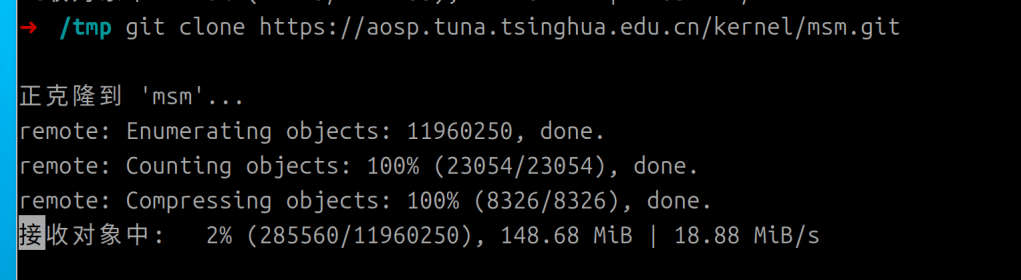
git clone https://aosp.tuna.tsinghua.edu.cn/kernel/msm.git
git branch -a //列出所有分支

goldfish是Android模拟器的内核源码。
git clone https://aosp.tuna.tsinghua.edu.cn/kernel/goldfish.git
git branch -a    //列出所有分支
编译AOSP
执行 lunch , 选择编译目标
 source build/envsetup.sh
lunch

You're building on Linux

Lunch menu .. Here are the common combinations:
     1. aosp_arm-eng
     2. aosp_arm64-eng
     3. aosp_barbet-userdebug
     4. aosp_bluejay-userdebug
     5. aosp_bluejay_car-userdebug
     6. aosp_bramble-userdebug
     7. aosp_bramble_car-userdebug
     8. aosp_car_arm-userdebug
     9. aosp_car_arm64-userdebug
     10. aosp_car_x86-userdebug
     11. aosp_car_x86_64-userdebug
     12. aosp_cf_arm64_auto-userdebug
     13. aosp_cf_arm64_phone-userdebug
     14. aosp_cf_x86_64_auto-userdebug
     15. aosp_cf_x86_64_auto_mdnd-userdebug
     16. aosp_cf_x86_64_foldable-userdebug
     17. aosp_cf_x86_64_only_phone_hsum-userdebug
     18. aosp_cf_x86_64_pc-userdebug
     19. aosp_cf_x86_64_phone-userdebug
     20. aosp_cf_x86_64_tv-userdebug
     21. aosp_cf_x86_phone-userdebug
     22. aosp_cf_x86_tv-userdebug
     23. aosp_cheetah-userdebug
     24. aosp_cheetah_car-userdebug
     25. aosp_cloudripper-userdebug
     26. aosp_coral-userdebug
     27. aosp_coral_car-userdebug
     28. aosp_felix-userdebug
     29. aosp_flame-userdebug
     30. aosp_flame_car-userdebug
     31. aosp_lynx-userdebug
     32. aosp_oriole-userdebug
     33. aosp_oriole_car-userdebug
     34. aosp_panther-userdebug
     35. aosp_panther_car-userdebug
     36. aosp_raven-userdebug
     37. aosp_raven_car-userdebug
     38. aosp_ravenclaw-userdebug
     39. aosp_redfin-userdebug
     40. aosp_redfin_car-userdebug
     41. aosp_redfin_vf-userdebug
     42. aosp_slider-userdebug
     43. aosp_sunfish-userdebug
     44. aosp_sunfish_car-userdebug
     45. aosp_tangorpro-userdebug
     46. aosp_trout_arm64-userdebug
     47. aosp_trout_x86_64-userdebug
     48. aosp_whitefin-userdebug
     49. aosp_x86-eng
     50. aosp_x86_64-eng
     51. arm_krait-eng
     52. arm_v7_v8-eng
     53. armv8-eng
     54. armv8_cortex_a55-eng
     55. armv8_kryo385-eng
     56. beagle_x15-userdebug
     57. beagle_x15_auto-userdebug
     58. car_ui_portrait-userdebug
     59. car_x86_64-userdebug
     60. db845c-userdebug
     61. gsi_car_arm64-userdebug
     62. gsi_car_x86_64-userdebug
     63. hikey-userdebug
     64. hikey64_only-userdebug
     65. hikey960-userdebug
     66. hikey960_tv-userdebug
     67. hikey_tv-userdebug
     68. poplar-eng
     69. poplar-user
     70. poplar-userdebug
     71. qemu_trusty_arm64-userdebug
     72. rb5-userdebug
     73. sdk_car_arm-userdebug
     74. sdk_car_arm64-userdebug
     75. sdk_car_md_x86_64-userdebug
     76. sdk_car_portrait_x86_64-userdebug
     77. sdk_car_x86-userdebug
     78. sdk_car_x86_64-userdebug
     79. sdk_pc_x86_64-userdebug
     80. silvermont-eng
     81. uml-userdebug
     82. yukawa-userdebug
     83. yukawa_sei510-userdebug

Which would you like? [aosp_arm-eng]
Pick from common choices above (e.g. 13) or specify your own (e.g. aosp_barbet-eng):
输入编号49 或者 aosp_x86-eng 编译x86平台的模拟器
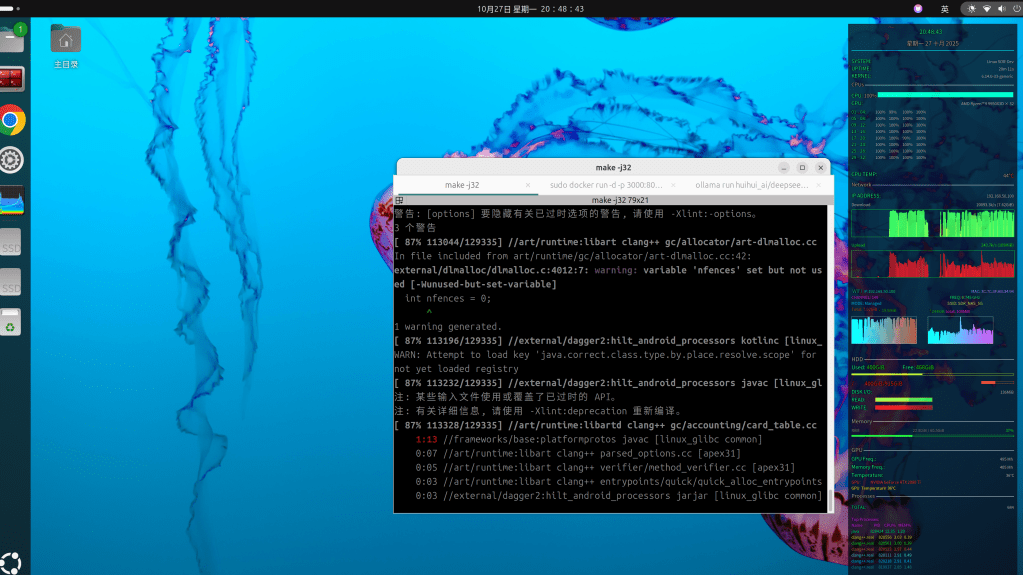
BUILDTYPE 指的是编译类型,有以下三种:
- user:用来正式发布到市场的版本,权限受限,如没有 root 权限,不能 dedug,adb默认处于停用状态。
- userdebug:在user版本的基础上开放了 root 权限和 debug 权限,adb默认处于启用状态。一般用于调试真机。
- eng:开发工程师的版本,拥有最大的权限(root等),具有额外调试工具的开发配置。一般用于模拟器。
选定类型后,执行make -j32 AMD 9950X3D 耗时半小时:

编译完成后,生成的文件位于 out/target/product/generic_x86/
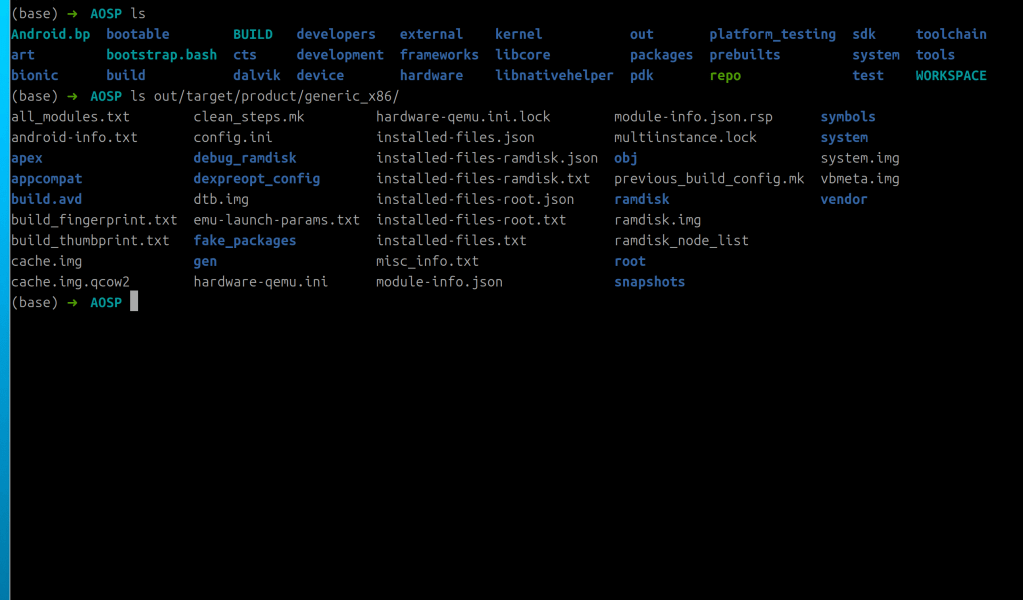
运行模拟器会提示:AOSP/out/target/product/generic_x86_64/userdata-qemu.img’: No such file or directory
清除之前编译的所有内容:
make clobber lunch sdk_phone_x86-userdebug
make -j32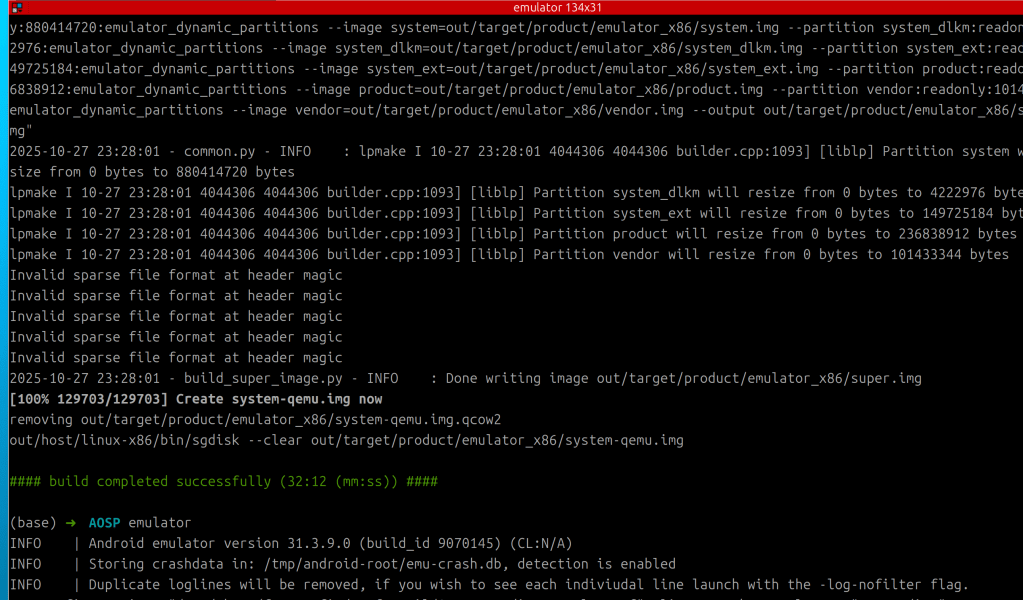
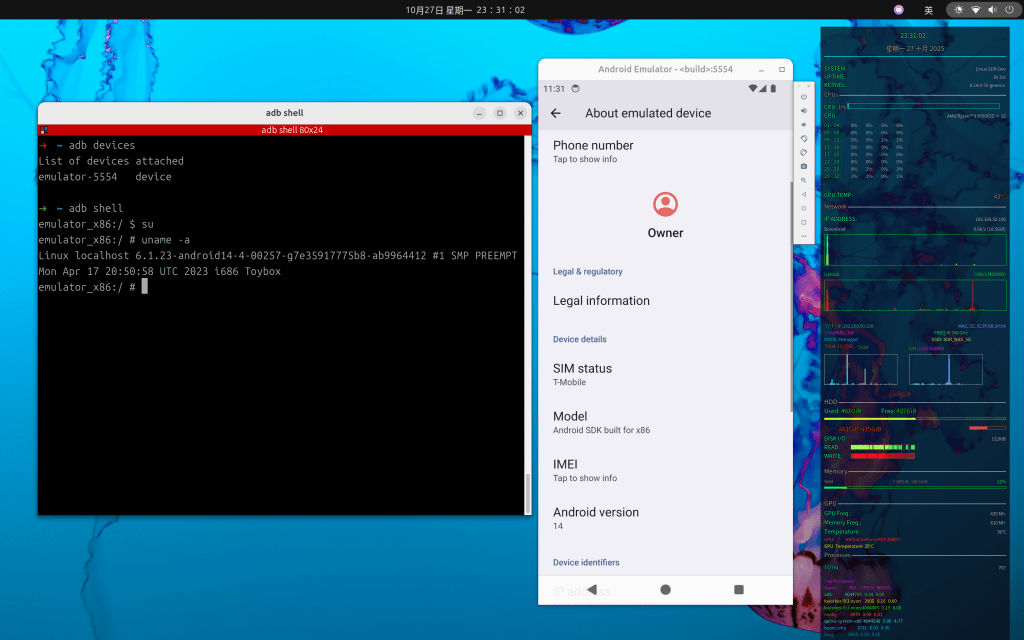
ls -la out/target/product/emulator_x86
总计 12569580
drwxr-xr-x 26 root root        4096 10月 28 09:44 .
drwxr-xr-x  3 root root        4096 10月 27 22:56 ..
-rw-r--r--  1 root root         667 10月 27 22:57 advancedFeatures.ini
-rw-r--r--  1 root root     1670974 10月 27 22:57 all_modules.txt
-rw-r--r--  1 root root          19 10月 27 23:07 android-info.txt
drwxr-xr-x 38 root root        4096 10月 27 23:25 apex
drwxr-xr-x  2 root root        4096 10月 27 23:27 appcompat
drwxr-xr-x  3 root root        4096 10月 27 23:41 build.avd
-rw-r--r--  1 root root          90 10月 27 22:57 build_fingerprint.txt
-rw-r--r--  1 root root          67 10月 27 22:57 build_thumbprint.txt
drwxr-xr-x  2 root root        4096 10月 27 23:13 cache
-rw-r--r--  1 root root    16777216 10月 27 23:13 cache.img
-rw-r--r--  1 root root      196616 10月 27 23:28 cache.img.qcow2
-rw-r--r--  1 root root      186462 10月 27 22:56 clean_steps.mk
-rw-r--r--  1 root root         418 10月 27 22:57 config.ini
-rw-r--r--  1 root root          45 10月 27 22:57 .copied_headers_list
drwxr-xr-x  3 root root        4096 10月 27 22:57 data
drwxr-xr-x  2 root root        4096 10月 27 23:13 debug_ramdisk
drwxr-xr-x  2 root root       12288 10月 27 23:11 dexpreopt_config
-rw-r--r--  1 root root          13 10月 27 22:57 dtb.img
-rw-r--r--  1 root root         106 10月 28 09:44 emu-launch-params.txt
-rw-r--r--  1 root root    18874368 10月 27 22:57 encryptionkey.img
-rw-r--r--  1 root root     1900544 10月 28 09:44 encryptionkey.img.qcow2
drwxr-xr-x  2 root root        4096 10月 27 23:13 fake_packages
drwxr-xr-x  4 root root        4096 10月 27 23:14 gen
-rw-r--r--  1 root root        3681 10月 28 09:44 hardware-qemu.ini
-rw-------  1 root root           6 10月 28 09:44 hardware-qemu.ini.lock
-rw-r--r--  1 root root     1851880 10月 28 09:44 initrd
-rw-r--r--  1 root root     2706063 10月 27 22:57 .installable_files.previous
-rw-r--r--  1 root root      395603 10月 27 23:25 installed-files.json
-rw-r--r--  1 root root       59309 10月 27 23:25 installed-files-product.json
-rw-r--r--  1 root root       21627 10月 27 23:25 installed-files-product.txt
-rw-r--r--  1 root root         777 10月 27 23:13 installed-files-ramdisk-debug.json
-rw-r--r--  1 root root         228 10月 27 23:13 installed-files-ramdisk-debug.txt
-rw-r--r--  1 root root         304 10月 27 23:13 installed-files-ramdisk.json
-rw-r--r--  1 root root          81 10月 27 23:13 installed-files-ramdisk.txt
-rw-r--r--  1 root root        2597 10月 27 22:57 installed-files-root.json
-rw-r--r--  1 root root         560 10月 27 22:57 installed-files-root.txt
-rw-r--r--  1 root root        8966 10月 27 23:11 installed-files-system_dlkm.json
-rw-r--r--  1 root root        2812 10月 27 23:11 installed-files-system_dlkm.txt
-rw-r--r--  1 root root       11253 10月 27 23:27 installed-files-system_ext.json
-rw-r--r--  1 root root        4347 10月 27 23:27 installed-files-system_ext.txt
-rw-r--r--  1 root root      128957 10月 27 23:25 installed-files.txt
-rw-r--r--  1 root root      113225 10月 27 23:14 installed-files-vendor.json
-rw-r--r--  1 root root        2674 10月 27 23:13 installed-files-vendor-ramdisk-debug.json
-rw-r--r--  1 root root         927 10月 27 23:13 installed-files-vendor-ramdisk-debug.txt
-rw-r--r--  1 root root        2201 10月 27 23:00 installed-files-vendor-ramdisk.json
-rw-r--r--  1 root root         780 10月 27 23:00 installed-files-vendor-ramdisk.txt
-rw-r--r--  1 root root       36956 10月 27 23:14 installed-files-vendor.txt
-rw-r--r--  1 root root    17374688 10月 27 22:57 kernel-ranchu-64
-rw-r--r--  1 root root        6671 10月 27 22:57 misc_info.txt
drwxr-xr-x  3 root root        4096 10月 27 23:28 modem_simulator
-rw-r--r--  1 root root    50165338 10月 27 22:57 module-info.json
-rw-r--r--  1 root root    53694177 10月 27 22:57 module-info.json.rsp
-rw-r--r--  1 root root           0 10月 28 09:44 multiinstance.lock
drwxr-xr-x 20 root root        4096 10月 27 23:28 obj
-rw-r--r--  1 root root          49 10月 27 22:57 previous_build_config.mk
drwxr-xr-x  8 root root        4096 10月 27 23:25 product
-rw-r--r--  1 root root   236838912 10月 27 23:25 product.img
-rw-r--r--  1 root root   239075328 10月 27 23:25 product-qemu.img
-rw-r--r--  1 root root          18 10月 28 09:45 quickbootChoice.ini
drwxr-xr-x 10 root root        4096 10月 27 23:13 ramdisk
-rw-r--r--  1 root root     1760542 10月 27 23:13 ramdisk.img
-rw-r--r--  1 root root         107 10月 27 22:57 ramdisk_node_list
-rw-r--r--  1 root root     1850135 10月 27 23:13 ramdisk-qemu.img
-rw-r--r--  1 root root           0 10月 28 09:44 read-snapshot.txt
drwxr-xr-x 27 root root        4096 10月 27 22:57 root
drwxr--r--  3 root root        4096 10月 27 23:28 snapshots
-rw-r--r--  1 root root        4644 10月 27 23:13 super_empty.img
-rw-r--r--  1 root root  8598323200 10月 27 23:28 super.img
drwxr-xr-x  8 root root        4096 10月 27 23:13 symbols
drwxr-xr-x 12 root root        4096 10月 27 23:14 system
drwxr-xr-x  4 root root        4096 10月 27 22:57 system_dlkm
-rw-r--r--  1 root root     4222976 10月 27 23:13 system_dlkm.img
-rw-r--r--  1 root root     7340032 10月 27 23:13 system_dlkm-qemu.img
drwxr-xr-x  7 root root        4096 10月 27 23:18 system_ext
-rw-r--r--  1 root root   149725184 10月 27 23:28 system_ext.img
-rw-r--r--  1 root root   152043520 10月 27 23:28 system_ext-qemu.img
-rw-r--r--  1 root root   880414720 10月 27 23:26 system.img
-rw-r--r--  1 root root         102 10月 27 23:28 system-qemu-config.txt
-rw-r--r--  1 root root  8601468928 10月 27 23:28 system-qemu.img
drwxr-xr-x  2 root root        4096 10月 27 22:57 test_harness_ramdisk
drwxr-xr-x  2 root root        4096 10月 28 09:44 tmpAdbCmds
-rw-r--r--  1 root root  4294967296 10月 27 23:13 userdata.img
-rw-r--r--  1 root root 10737418240 10月 27 23:28 userdata-qemu.img
-rw-r--r--  1 root root   657326080 10月 28 09:45 userdata-qemu.img.qcow2
-rw-r--r--  1 root root        8192 10月 27 23:28 vbmeta.img
drwxr-xr-x 10 root root        4096 10月 27 23:13 vendor
-rw-r--r--  1 root root      335872 10月 27 23:13 vendor_boot-debug.img
-rw-r--r--  1 root root   100663296 10月 27 23:08 vendor_boot.img
-rw-r--r--  1 root root      337920 10月 27 23:13 vendor_boot-test-harness.img
drwxr-xr-x  2 root root        4096 10月 27 23:13 vendor_debug_ramdisk
-rw-r--r--  1 root root   101433344 10月 27 23:14 vendor.img
-rw-r--r--  1 root root   103809024 10月 27 23:14 vendor-qemu.img
drwxr-xr-x  4 root root        4096 10月 27 22:57 vendor_ramdisk
-rw-r--r--  1 root root      327647 10月 27 23:13 vendor_ramdisk-debug.img
-rw-r--r--  1 root root       89593 10月 27 23:00 vendor_ramdisk.img
-rw-r--r--  1 root root      328037 10月 27 23:13 vendor_ramdisk-test-harness.img
-rw-r--r--  1 root root         356 10月 27 23:28 VerifiedBootParams.textproto
-rw-r--r--  1 root root           3 10月 27 23:28 version_num.cache


ls out/target/product/emulator_x86 |grep img
cache.img
cache.img.qcow2
dtb.img
encryptionkey.img
encryptionkey.img.qcow2
product.img
product-qemu.img
ramdisk.img
ramdisk-qemu.img
super_empty.img
super.img
system_dlkm.img
system_dlkm-qemu.img
system_ext.img
system_ext-qemu.img
system.img
system-qemu.img
userdata.img
userdata-qemu.img
userdata-qemu.img.qcow2
vbmeta.img
vendor_boot-debug.img
vendor_boot.img
vendor_boot-test-harness.img
vendor.img
vendor-qemu.img
vendor_ramdisk-debug.img
vendor_ramdisk.img
vendor_ramdisk-test-harness.img
单独编译:
| cd packages/apps/Settings mm |
其它:
- mmm:编译指定目录下的模块,不编译它所依赖的其它模块。
- mma:编译当前目录下的模块及其依赖项。
- mmma:编译指定路径下所有模块,并且包含依赖。
Android eBPF
https://source.android.com/docs/core/architecture/kernel/bpf
eBPF 是 Linux 内核中一个非常灵活与高效的类虚拟机(virtual machine-like)组件,能够在许多内核 hook 点安全地执行字节码(bytecode)。很多内核子系统都已经使用了 BPF,例如常见的网络、跟踪与安全。这是 linux 内核中比较新的特性,可能需要较新的手机才搭载了比较完美支持 eBPF 的内核。
基于eBPF技术,可以在没有CA证书的情况下实现对SSL/TLS加密流量进行抓包、嗅探、分析
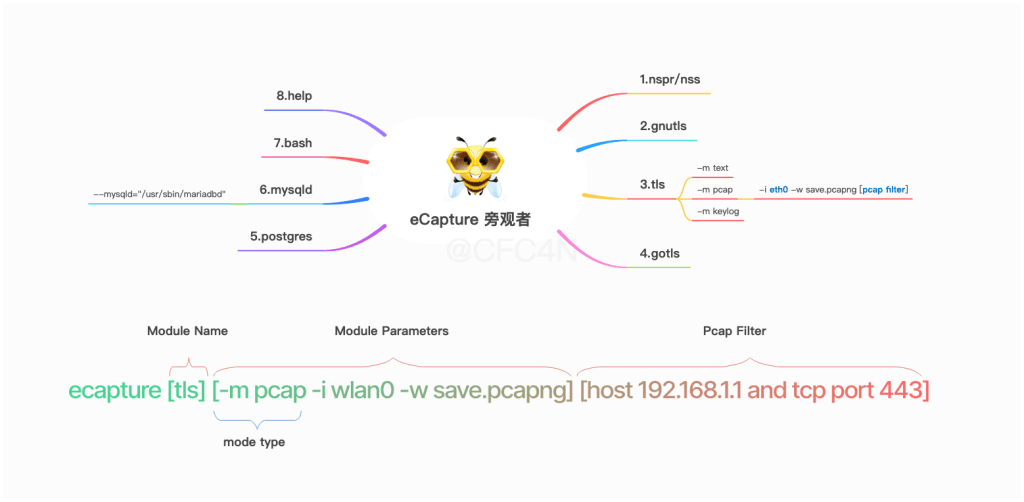
https://github.com/gojue/ecapture Capturing SSL/TLS plaintext without a CA certificate using eBPF. Supported on Linux/Android kernels for amd64/arm64.
eCapture 有8个模块,分别支持openssl/gnutls/nspr/boringssl/gotls等类库的TLS/SSL加密类库的明文捕获、Bash、Mysql、PostGres软件审计。
- bash 捕获bash、zsh命令行的输入输出
- gnutls 捕获基于gnutls类库加密通讯的明文内容
- gotls 捕获使用Golang语言编写的,基于内置crypt类库实现TLS/HTTPS加密通讯的明文内容
- mysqld 捕获Mysqld的SQL查询,适用于数据库审计场景,支持Mysqld 5.6/5.7/8.0等
- nss 捕获基于nss类库加密通讯的明文内容
- postgres 支持postgres 10+的数据库审计,捕获查询语句
- tls 捕获基于Openssl/Boringssl的加密通讯的明文内容,支持Openssl 1.0.x/1.1.x/3.x系列所有版本,支持BoringSSL所有发行版本
按照Google官方文档的信息,只能在内核版本为4.9或更高且最初搭载了Android P版本的Android设备才能使用eBPF。https://source.android.com/devices/tech/datausage/ebpf-traffic-monitor
所以需要pixel 3系列以上的设备。
ecapture需要Linux 内核4.18,所以正常的手机ROM自带的内核无法适配,需要更换ROM的内核版本。
./ecapture tls –libssl=”/system/lib64/libssl.so” 通过指定libssl.so 路径实现对HTTPS流量的捕获、解密
参考:https://www.cnblogs.com/Tu9oh0st/p/16385474.html
wget https://github.com/gojue/ecapture/releases/download/v1.4.3/ecapture-v1.4.3-android-amd64.tar.gz
tar zxvf ecapture-v1.4.3-android-amd64.tar.gz
cd ecapture-v1.4.3-android-amd64
adb push ecapture /data/local/tmp
adb shell
su
cd /data/local/tmp
emulator_x86:/data/local/tmp # ./ecapture
NAME:
	eCapture - Capturing SSL/TLS plaintext without a CA certificate using eBPF. Supported on Linux/Android kernels for amd64/arm64.

USAGE:
	eCapture [flags]

VERSION:
	androidgki_amd64:v1.4.3:6.8.0-1031-azure

COMMANDS:
	bash	capture bash command
	gotls	Capturing plaintext communication from Golang programs encrypted with TLS/HTTPS.
	help	Help about any command
	tls	Used to capture TLS/SSL text content without the need for a CA certificate. (Supports OpenSSL 1.0.x/1.1.x/3.x or newer).

DESCRIPTION:
	eCapture(旁观者) is a tool that can capture plaintext packets
	such as HTTPS and TLS without installing a CA certificate.
	It can also capture bash commands, which is suitable for
	security auditing scenarios, such as database auditing of mysqld, etc (disabled on Android).
	Support Linux(Android)  X86_64 4.18/aarch64 5.5 or newer.
	Repository: https://github.com/gojue/ecapture
	HomePage: https://ecapture.cc

	Usage:
	  ecapture tls -h
	  ecapture bash -h

	Docker usage:
	docker pull gojue/ecapture:latest
	docker run --rm --privileged=true --net=host -v ${HOST_PATH}:${CONTAINER_PATH} gojue/ecapture -h

OPTIONS:
  -b, --btf=0				enable BTF mode.(0:auto; 1:core; 2:non-core)
  -d, --debug[=false]			enable debug logging
      --ecaptureq=""			listening server, waiting for clients to connect before sending events and logs; false: send directly to the remote server.
      --eventaddr=""			the server address that receives the captured event. --eventaddr ws://127.0.0.1:8090/ecapture or tcp://127.0.0.1:8090, default: same as logaddr
      --eventroratesize=0		the rorate size(MB) of the event collector file, 1M~65535M, only works for eventaddr server is file. --eventaddr=tls.log --eventroratesize=1 --eventroratetime=30
      --eventroratetime=0		the rorate time(s) of the event collector file, 1s~65535s, only works for eventaddr server is file. --eventaddr=tls.log --eventroratesize=1 --eventroratetime=30
  -h, --help[=false]			help for eCapture
      --hex[=false]			print byte strings as hex encoded strings
      --listen="localhost:28256"	Listens on a port, receives HTTP requests, and is used to update the runtime configuration, default: 127.0.0.1:28256
  -l, --logaddr=""			send logs to this server. -l /tmp/ecapture.log or -l ws://127.0.0.1:8090/ecapture or -l tcp://127.0.0.1:8080
      --mapsize=1024			eBPF map size per CPU,for events buffer. default:1024 * PAGESIZE. (KB)
  -p, --pid=0				if pid is 0 then we target all pids
  -t, --tsize=0				the truncate size in text mode, default: 0 (B), no truncate
  -u, --uid=0				if uid is 0 then we target all users
  -v, --version[=false]			version for eCapture
 | 混沌通信| RadioHub | IoT RF Hardware Hacking | 博观而约取 厚积而薄发
Leave a comment